Trabla: LESS CSS: compile less to css on windows using npm ( lessc )
Less is a CSS pre-processor, meaning that it extends the CSS language, adding features that allow variables, mixins, functions and many other techniques that allow you to make CSS that is more maintainable, themable and extendable.
This tutorial explains how to compile .less files to .css using npm ( node package manager ) on windows operating system.
Solving:
1. Install
npm for windows ( included in node.js installation )
https://codingtrabla.blogspot.com/2016/03/npm-npm-install-on-windows.html
2. Create simple text file with extention
.less and put following code
e.g.
C:\Users\samuraikit\Desktop\less-demo\demo.less
@base: #f938ab;
.box-shadow(@style, @c) when (iscolor(@c)) {
-webkit-box-shadow: @style @c;
box-shadow: @style @c;
}
.box-shadow(@style, @alpha: 50%) when (isnumber(@alpha)) {
.box-shadow(@style, rgba(0, 0, 0, @alpha));
}
.box {
color: saturate(@base, 5%);
border-color: lighten(@base, 30%);
div { .box-shadow(0 0 5px, 30%) }
}
3. Run windows command promt ( cmd ), change directory to location of your .less file
e.g. >cd C:\Users\samuraikit\Desktop\less-demo
4. Install npm less compiler - lessc. Type following command and press enter
npm install -g less
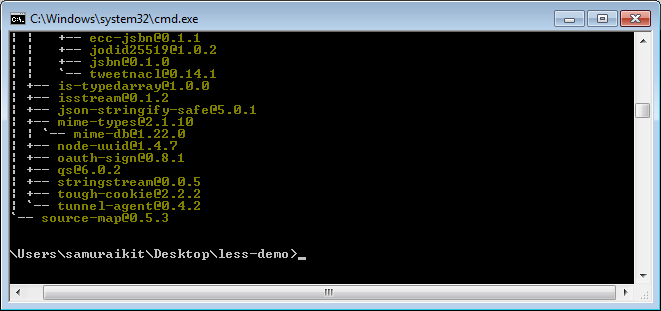
Example console output:
C:\Users\samuraikit\Desktop\less-demo>npm install -g less
C:\Users\samuraikit\AppData\Roaming\npm\lessc -> C:\Users\samuraikit\AppData\Roa
ming\npm\node_modules\less\bin\lessc
C:\Users\samuraikit\AppData\Roaming\npm
`-- less@2.6.1
+-- errno@0.1.4
| `-- prr@0.0.0
+-- graceful-fs@4.1.3
+-- image-size@0.4.0
+-- mime@1.3.4
+-- mkdirp@0.5.1
| `-- minimist@0.0.8
+-- promise@7.1.1
| `-- asap@2.0.3
+-- request@2.69.0
| +-- aws-sign2@0.6.0
| +-- aws4@1.3.2
| | `-- lru-cache@4.0.1
| | +-- pseudomap@1.0.2
| | `-- yallist@2.0.0
| +-- bl@1.0.3
| | `-- readable-stream@2.0.6
| | +-- core-util-is@1.0.2
| | +-- inherits@2.0.1
| | +-- isarray@1.0.0
| | +-- process-nextick-args@1.0.6
| | +-- string_decoder@0.10.31
| | `-- util-deprecate@1.0.2
| +-- caseless@0.11.0
| +-- combined-stream@1.0.5
| | `-- delayed-stream@1.0.0
| +-- extend@3.0.0
| +-- forever-agent@0.6.1
| +-- form-data@1.0.0-rc4
| | `-- async@1.5.2
| +-- har-validator@2.0.6
| | +-- chalk@1.1.1
| | | +-- ansi-styles@2.2.0
| | | | `-- color-convert@1.0.0
| | | +-- escape-string-regexp@1.0.5
| | | +-- has-ansi@2.0.0
| | | | `-- ansi-regex@2.0.0
| | | +-- strip-ansi@3.0.1
| | | `-- supports-color@2.0.0
| | +-- commander@2.9.0
| | | `-- graceful-readlink@1.0.1
| | +-- is-my-json-valid@2.13.1
| | | +-- generate-function@2.0.0
| | | +-- generate-object-property@1.2.0
| | | | `-- is-property@1.0.2
| | | +-- jsonpointer@2.0.0
| | | `-- xtend@4.0.1
| | `-- pinkie-promise@2.0.0
| | `-- pinkie@2.0.4
| +-- hawk@3.1.3
| | +-- boom@2.10.1
| | +-- cryptiles@2.0.5
| | +-- hoek@2.16.3
| | `-- sntp@1.0.9
| +-- http-signature@1.1.1
| | +-- assert-plus@0.2.0
| | +-- jsprim@1.2.2
| | | +-- extsprintf@1.0.2
| | | +-- json-schema@0.2.2
| | | `-- verror@1.3.6
| | `-- sshpk@1.7.4
| | +-- asn1@0.2.3
| | +-- dashdash@1.13.0
| | | `-- assert-plus@1.0.0
| | +-- ecc-jsbn@0.1.1
| | +-- jodid25519@1.0.2
| | +-- jsbn@0.1.0
| | `-- tweetnacl@0.14.1
| +-- is-typedarray@1.0.0
| +-- isstream@0.1.2
| +-- json-stringify-safe@5.0.1
| +-- mime-types@2.1.10
| | `-- mime-db@1.22.0
| +-- node-uuid@1.4.7
| +-- oauth-sign@0.8.1
| +-- qs@6.0.2
| +-- stringstream@0.0.5
| +-- tough-cookie@2.2.2
| `-- tunnel-agent@0.4.2
`-- source-map@0.5.3
C:\Users\samuraikit\Desktop\less-demo>
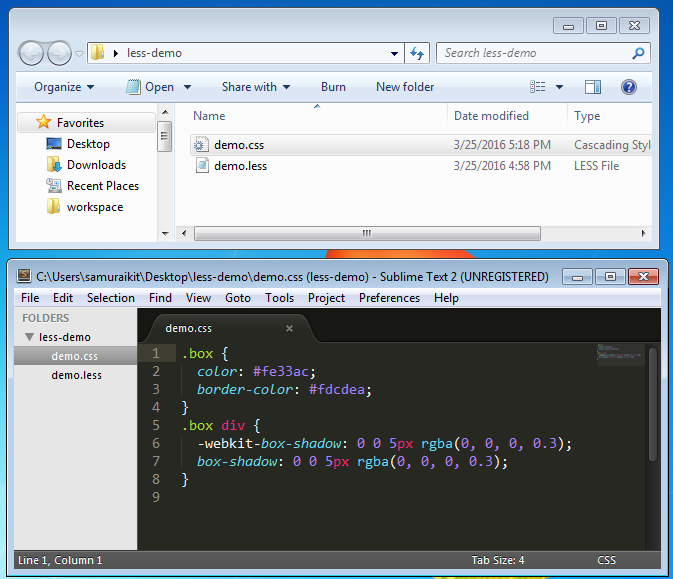
5. Compile .less file to .css using following command:
lessc demo.less demo.css
6. Output css file: