Showing posts with label phpBB. Show all posts

Install phpBB 3.2.0 via Bitnami on Windows 7 localhost

Trabla: Install phpBB 3.2.0 via Bitnami on Windows 7 localhost - opensource PHP bulletin board / forum software

Install phpBB 3.2.0 via Bitnami on Windows 7 localhost


phpBB is an Internet forum package in the PHP scripting language. The name "phpBB" is an abbreviation of PHP Bulletin Board. phpBB  available under the GNU General Public License, phpBB is free and open source software.

Features of phpBB include support for multiple database engines (PostgreSQL, SQLite, MySQL, Oracle Database, Microsoft SQL Server), flat message structure (as opposed to threaded), hierarchical subforums, topic split/merge/lock, user groups, multiple attachments per post, full-text search, plugins and various notification options (e-mail, Jabber instant messaging, ATOM feeds).

phpBB Official Site - https://www.phpbb.com/
Bitnami phpBB Official Site - https://bitnami.com/stack/phpbb


Solving:


Install phpBB 3.1.10 on windows 7 localhost ( XAMPP 5.6.24 )

Trabla: Install phpBB 3.1.10 on windows 7 x64 localhost ( XAMPP 5.6.24 ) - open source PHP bulletin board / forum software

Install phpBB  3.1.10 PHP forum bulletin board on windows 7 localhost XAMPP tutorial

phpBB is a free flat-forum bulletin board software solution that can be used to stay in touch with a group of people or can power your entire website. With an extensive database of user-created modifications and styles database containing hundreds of style and image packages to customise your board, you can create a very unique forum in minutes.
No other bulletin board software offers a greater complement of features, while maintaining efficiency and ease of use. Best of all, phpBB is completely free.


Solving:


Watch on YouTube

1.  Download and install XAMPP 5.6.24 from official site:
https://www.apachefriends.org/download.html

Install phpBB  3.1.10 PHP forum bulletin board on windows 7 localhost XAMPP tutorial 1


2.  Download and install  ImageMagick 7.0.3-5-Q16-x64  free and opensource image processing software
from official site: http://www.imagemagick.org/script/binary-releases.php

ATTENTION:
1) Change installation destination folder to C:\ImageMagick
2) Enable checkbox  "Install legacy utilities ( e.g. convert ) "

Install phpBB  3.1.10 PHP forum bulletin board on windows 7 localhost XAMPP tutorial 2

Install phpBB  3.1.10 PHP forum bulletin board on windows 7 localhost XAMPP tutorial 3

Install phpBB  3.1.10 PHP forum bulletin board on windows 7 localhost XAMPP tutorial 4


Windows installation detailed tutorial:
 https://codingtrabla.blogspot.com/2016/07/install-imagemagick-702-5-q16-x64-on.html


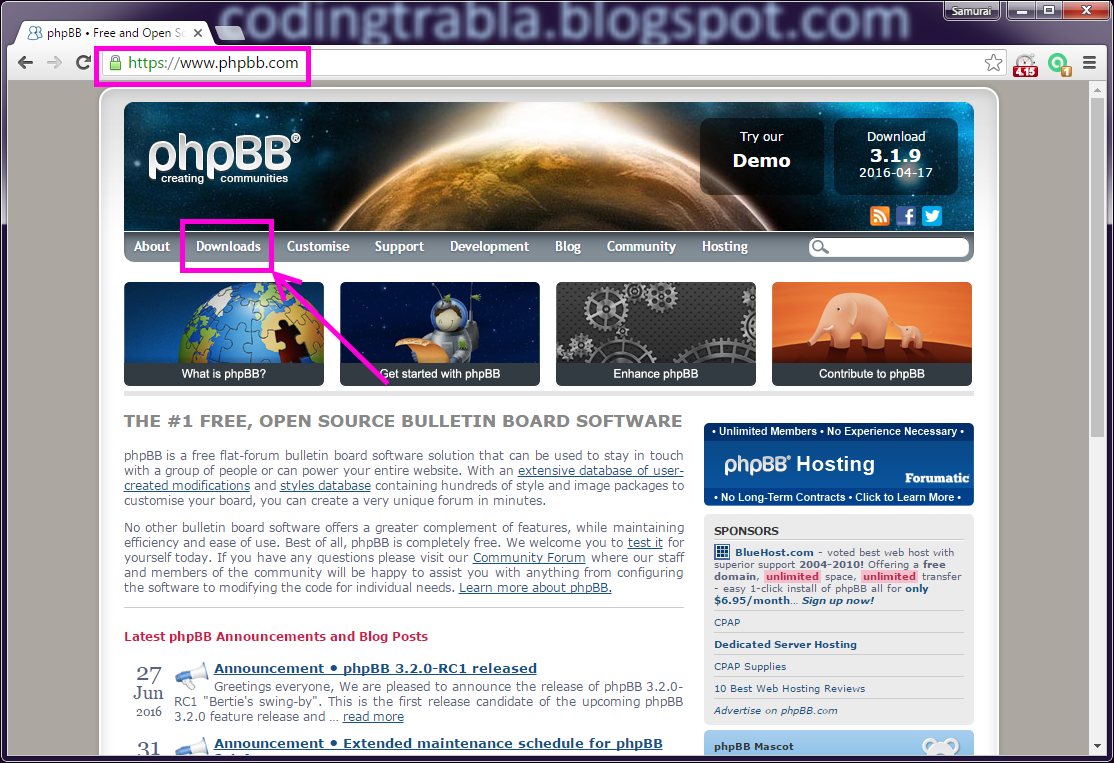
3.  Download phpBB 3.1.10 bulletin board / forum   installer from official site:
https://www.phpbb.com/

Install phpBB  3.1.10 PHP forum bulletin board on windows 7 localhost XAMPP tutorial 5

Install phpBB  3.1.10 PHP forum bulletin board on windows 7 localhost XAMPP tutorial 6

Install phpBB  3.1.10 PHP forum bulletin board on windows 7 localhost XAMPP tutorial 7


4. Create folder \phpbb XAMPP htdocs folder

C:\xampp\htdocs\phpbb

and copy all files from downloaded phpBB 3.1.10 bulletin board / forum   .zip source

Install phpBB  3.1.10 PHP forum bulletin board on windows 7 localhost XAMPP tutorial 8

Install phpBB  3.1.10 PHP forum bulletin board on windows 7 localhost XAMPP tutorial 9


5. Run XAMPP Control Panel 

open php.ini file ( Apache ->  Config-> PHP(php.ini) )

Install phpBB  3.1.10 PHP forum bulletin board on windows 7 localhost XAMPP tutorial 10


- change max_execution_time value
from max_execution_time=30 to max_execution_time=600

Install phpBB  3.1.10 PHP forum bulletin board on windows 7 localhost XAMPP tutorial 11

- save  & close php.ini
- start Apache
- start Database

Install phpBB  3.1.10 PHP forum bulletin board on windows 7 localhost XAMPP tutorial 12


6. Open in browser following url to start  phpBB 3.1.10   web installation

http://localhost/phpbb

"OVERVIEW - Introduction" page of phpBB 3.1.10 bulletin board / forum  web installation

- click on "INSTALL" tab

Install phpBB  3.1.10 PHP forum bulletin board on windows 7 localhost XAMPP tutorial 13


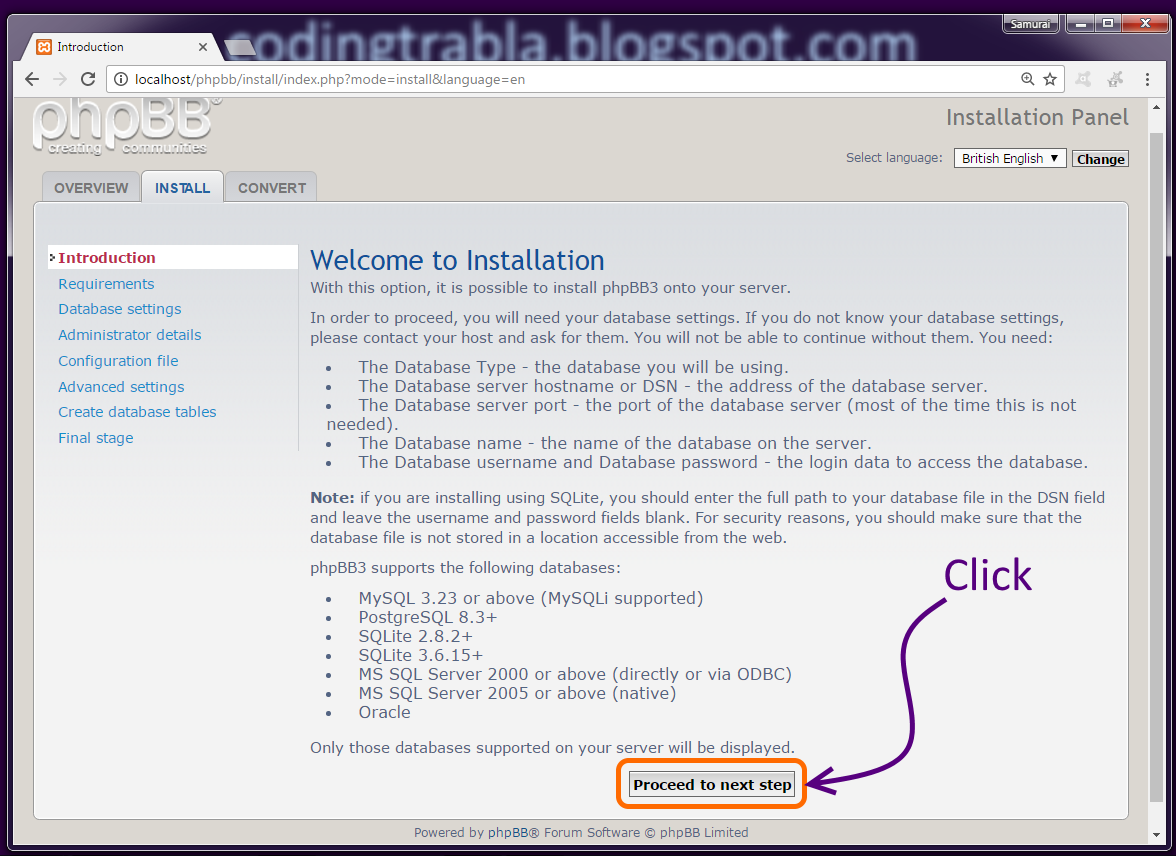
7.  "INSTALL- Introduction" page of phpBB 3.1.10 bulletin board / forum  web installation

- click "Proceed to next step" button

Install phpBB  3.1.10 PHP forum bulletin board on windows 7 localhost XAMPP tutorial 14

8. "INSTALL- Requirements" page of phpBB 3.1.10 bulletin board / forum  web installation

- scroll down
- check if "ImageMagick" detected
- click "Start Install" button

Install phpBB  3.1.10 PHP forum bulletin board on windows 7 localhost XAMPP tutorial 15

Install phpBB  3.1.10 PHP forum bulletin board on windows 7 localhost XAMPP tutorial 16

Install phpBB  3.1.10 PHP forum bulletin board on windows 7 localhost XAMPP tutorial 17


9. "INSTALL- Database settings"  page of phpBB 3.1.10 bulletin board / forum  web installation

Install phpBB  3.1.10 PHP forum bulletin board on windows 7 localhost XAMPP tutorial 18

Now we need to create Database for   phpBB 3.1.10 bulletin board / forum

1) Open phpMyAdmin in new browser tab (or window :) ) -

http://localhost/phpmyadmin

2) Open SQL tab
3) Execute following query

Install phpBB  3.1.10 PHP forum bulletin board on windows 7 localhost XAMPP tutorial 19

CREATE DATABASE `phpbb` 
DEFAULT CHARACTER SET utf8 COLLATE utf8_general_ci;

CREATE USER 'phpbb-owner'@'localhost'; 
CREATE USER 'phpbb-owner'@'127.0.0.1';
CREATE USER 'phpbb-owner'@'::1';

SET PASSWORD 
FOR 'phpbb-owner'@'localhost' = PASSWORD('phpbb123$%');
SET PASSWORD 
FOR 'phpbb-owner'@'127.0.0.1' = PASSWORD('phpbb123$%');
SET PASSWORD 
FOR 'phpbb-owner'@'::1' = PASSWORD('phpbb123$%');


GRANT ALL PRIVILEGES ON 
`phpbb`.* TO 'phpbb-owner'@'localhost' WITH GRANT OPTION;
GRANT ALL PRIVILEGES ON 
`phpbb`.* TO 'phpbb-owner'@'127.0.0.1' WITH GRANT OPTION;
GRANT ALL PRIVILEGES ON 
`phpbb`.* TO 'phpbb-owner'@'::1' WITH GRANT OPTION;

Install phpBB  3.1.10 PHP forum bulletin board on windows 7 localhost XAMPP tutorial 20

Install phpBB  3.1.10 PHP forum bulletin board on windows 7 localhost XAMPP tutorial 21

Go back  to    phpBB 3.1.10 bulletin board / forum  installation page

- type Database type MySQL with MySQLi extention
- type Database server hostname or DNS localhost
- type Database server port 3306
- type Database name -  phpbb
- type Database user phpbb-owner
- type Database password-  phpbb123$%

- click "Proceed to next step"

Install phpBB  3.1.10 PHP forum bulletin board on windows 7 localhost XAMPP tutorial 22


10. "INSTALL- Database settings - Test connection" page of   phpBB 3.1.10 bulletin board / forum web installation

- click "Proceed to next step"

Install phpBB  3.1.10 PHP forum bulletin board on windows 7 localhost XAMPP tutorial 23

11. "INSTALL- Administrator details" page of   phpBB 3.1.10 bulletin board / forum web installation

- type your admin credentials
- click "Proceed to next step"

Install phpBB  3.1.10 PHP forum bulletin board on windows 7 localhost XAMPP tutorial 24

12. "INSTALL- Administrator details - test" page of   phpBB 3.1.10 bulletin board / forum web installation

- click "Proceed to next step"

Install phpBB  3.1.10 PHP forum bulletin board on windows 7 localhost XAMPP tutorial 25

13. "- Configuration file" page of   phpBB 3.1.10 bulletin board / forum web installation

- click "Proceed to next step"

Install phpBB  3.1.10 PHP forum bulletin board on windows 7 localhost XAMPP tutorial 26


14. "INSTALL- Advance settings" page of   phpBB 3.1.10 bulletin board / forum web installation

disable board-wide emails
- scroll down
- click "Proceed to next step"

Install phpBB  3.1.10 PHP forum bulletin board on windows 7 localhost XAMPP tutorial 27

Install phpBB  3.1.10 PHP forum bulletin board on windows 7 localhost XAMPP tutorial 28


15. "INSTALL- Create database tables" page of   phpBB 3.1.10 bulletin board / forum web installation

- click "Proceed to next step"

Install phpBB  3.1.10 PHP forum bulletin board on windows 7 localhost XAMPP tutorial 29

16. "INSTALL- Final stage" page of   phpBB 3.1.10 bulletin board / forum web installation

- delete \install folder ( e.g. C:\xampp\htdocs\phpbb\install  )

Install phpBB  3.1.10 PHP forum bulletin board on windows 7 localhost XAMPP tutorial 30


- click "Login" button

Install phpBB  3.1.10 PHP forum bulletin board on windows 7 localhost XAMPP tutorial 31

Hooray !!! Installation ready !!!  Enjoy    phpBB 3.1.10 bulletin board / forum

- public forum

Install phpBB  3.1.10 PHP forum bulletin board on windows 7 localhost XAMPP tutorial 32


Moderator Control Panel  ( MCP )


Install phpBB  3.1.10 PHP forum bulletin board on windows 7 localhost XAMPP tutorial 33


Administrator Control Panel ( ACP )

Install phpBB  3.1.10 PHP forum bulletin board on windows 7 localhost XAMPP tutorial 34

Install phpBB 3.1.9 on Windows ( XAMPP 5.6.21 )

Trabla: Install phpBB 3.1.9 on Windows ( XAMPP 5.6.21 ) - free open-source flat-forum bulletin board software solution

Install phpBB PHP forum 3.1.9 on Windows ( XAMPP 5.6.21 ) tutorial

phpBB is a free flat-forum bulletin board software solution that can be used to stay in touch with a group of people or can power your entire website. With an extensive database of user-created modifications and styles database containing hundreds of style and image packages to customise your board, you can create a very unique forum in minutes.
No other bulletin board software offers a greater complement of features, while maintaining efficiency and ease of use. Best of all, phpBB is completely free.

Latest Tutorial - Install phpBB 3.1.10 on windows 7 x64 localhost ( XAMPP 5.6.24 ) - open source PHP bulletin board / forum software


Solving:


1.  Download and install XAMPP 5.6.21 from official site:
https://www.apachefriends.org/download.html

Install phpBB PHP forum 3.1.9 on Windows ( XAMPP 5.6.21 ) tutorial 1


2.  Download and install  ImageMagick 7.0.2-5-Q16-x64  free and opensource image processing software
from official site: http://www.imagemagick.org/script/index.php


Windows installation detailed tutorial:
 https://codingtrabla.blogspot.com/2016/07/install-imagemagick-702-5-q16-x64-on.html

3.  Download phpBB 3.1.9 forum   installer from official site:
https://www.phpbb.com/

Install phpBB PHP forum 3.1.9 on Windows ( XAMPP 5.6.21 ) tutorial 2

Install phpBB PHP forum 3.1.9 on Windows ( XAMPP 5.6.21 ) tutorial 3

Install phpBB PHP forum 3.1.9 on Windows ( XAMPP 5.6.21 ) tutorial 4


4. Create folder \phpbb XAMPP htdocs folder
C:\xampp\htdocs\phpbb
and copy all files from downloaded phpBB 3.1.9 forum   .zip source

Install phpBB PHP forum 3.1.9 on Windows ( XAMPP 5.6.21 ) tutorial 5


5. Run XAMPP Control Panel 

open php.ini file ( Apache ->  Config-> PHP(php.ini) )

Install phpBB PHP forum 3.1.9 on Windows ( XAMPP 5.6.21 ) tutorial 6


- change max_execution_time value
from max_execution_time=30 to max_execution_time=120

Install phpBB PHP forum 3.1.9 on Windows ( XAMPP 5.6.21 ) tutorial 7

Install phpBB PHP forum 3.1.9 on Windows ( XAMPP 5.6.21 ) tutorial 8


- save  & close php.ini
- start Apache
- start Database

Install phpBB PHP forum 3.1.9 on Windows ( XAMPP 5.6.21 ) tutorial 9

6. Open in browser following url to start  phpBB 3.1.9 forum  web installation
http://localhost/phpbb

- click on "Install" tab

Install phpBB PHP forum 3.1.9 on Windows ( XAMPP 5.6.21 ) tutorial 10


7.  "Install - Introduction" page
- click "Proceed to next step" button

Install phpBB PHP forum 3.1.9 on Windows ( XAMPP 5.6.21 ) tutorial 11


8. "Install - Requirements" page
- scroll down
- check if "ImageMagick" detected
- click "Start Install" button

Install phpBB PHP forum 3.1.9 on Windows ( XAMPP 5.6.21 ) tutorial 12

Install phpBB PHP forum 3.1.9 on Windows ( XAMPP 5.6.21 ) tutorial 13

Install phpBB PHP forum 3.1.9 on Windows ( XAMPP 5.6.21 ) tutorial 14


9. "Install - Database settings" page

Install phpBB PHP forum 3.1.9 on Windows ( XAMPP 5.6.21 ) tutorial 15

Now we need to create Database for   phpBB 3.1.9 forum

1) Open phpMyAdmin in new browser tab (or window :) ) - http://localhost/phpmyadmin
2) Open SQL tab
3) Execute following query

Install phpBB PHP forum 3.1.9 on Windows ( XAMPP 5.6.21 ) tutorial 16

CREATE DATABASE `phpbb` 
DEFAULT CHARACTER SET utf8 COLLATE utf8_general_ci;

CREATE USER 'phpbb-owner'@'localhost'; 
CREATE USER 'phpbb-owner'@'127.0.0.1';
CREATE USER 'phpbb-owner'@'::1';

SET PASSWORD 
FOR 'phpbb-owner'@'localhost' = PASSWORD('phpbb123$%');
SET PASSWORD 
FOR 'phpbb-owner'@'127.0.0.1' = PASSWORD('phpbb123$%');
SET PASSWORD 
FOR 'phpbb-owner'@'::1' = PASSWORD('phpbb123$%');


GRANT ALL PRIVILEGES ON 
`phpbb`.* TO 'phpbb-owner'@'localhost' WITH GRANT OPTION;
GRANT ALL PRIVILEGES ON 
`phpbb`.* TO 'phpbb-owner'@'127.0.0.1' WITH GRANT OPTION;
GRANT ALL PRIVILEGES ON 
`phpbb`.* TO 'phpbb-owner'@'::1' WITH GRANT OPTION;

Install phpBB PHP forum 3.1.9 on Windows ( XAMPP 5.6.21 ) tutorial 17

Install phpBB PHP forum 3.1.9 on Windows ( XAMPP 5.6.21 ) tutorial 18

Go back  to   phpBB 3.1.9 forum  installation page

- type Database type MySQL with MySQLi extention
- type Database server hostname or DNS localhost
- type Database server port 3306
- type Database name -  phpbb
- type Database user phpbb-owner
- type Database password-  phpbb123$%

- click "Proceed to next step"

Install phpBB PHP forum 3.1.9 on Windows ( XAMPP 5.6.21 ) tutorial 19


10. "Install - Database settings - Test connection" page
- click "Proceed to next step"

Install phpBB PHP forum 3.1.9 on Windows ( XAMPP 5.6.21 ) tutorial 20

11. "Install - Administrator details" page
- type your admin credentials
- click "Proceed to next step"

Install phpBB PHP forum 3.1.9 on Windows ( XAMPP 5.6.21 ) tutorial 21

12. "Install - Administrator details - test" page
- click "Proceed to next step"

Install phpBB PHP forum 3.1.9 on Windows ( XAMPP 5.6.21 ) tutorial 22

13. "Install - Configuration file" page
- click "Proceed to next step"

Install phpBB PHP forum 3.1.9 on Windows ( XAMPP 5.6.21 ) tutorial 23


14. "Install - Advance settings" page
- disable board-wide emails
- scroll down
- click "Proceed to next step"

Install phpBB PHP forum 3.1.9 on Windows ( XAMPP 5.6.21 ) tutorial 24


Install phpBB PHP forum 3.1.9 on Windows ( XAMPP 5.6.21 ) tutorial 25


15. "Install - Create database tables" page
- click "Proceed to next step"

Install phpBB PHP forum 3.1.9 on Windows ( XAMPP 5.6.21 ) tutorial 26


16. "Install - Final stage" page

- delete \install folder ( e.g. C:\xampp\htdocs\phpbb\install  )


Install phpBB PHP forum 3.1.9 on Windows ( XAMPP 5.6.21 ) tutorial 27


- click "Login" button

Install phpBB PHP forum 3.1.9 on Windows ( XAMPP 5.6.21 ) tutorial 28


Hooray !!! Installation ready !!!  Enjoy  phpBB 3.1.9 forum  

- public forum

Install phpBB PHP forum 3.1.9 on Windows ( XAMPP 5.6.21 ) tutorial 29

- Moderator Control Panel

Install phpBB PHP forum 3.1.9 on Windows ( XAMPP 5.6.21 ) tutorial 30

- Administrator Control Panel ( ACP )

Install phpBB PHP forum 3.1.9 on Windows ( XAMPP 5.6.21 ) tutorial 31

Install phpBB PHP forum 3.1.9 on Windows ( XAMPP 5.6.21 ) tutorial 32

Install phpBB PHP forum 3.1.9 on Windows ( XAMPP 5.6.21 ) tutorial 33

Install phpBB PHP forum 3.1.9 on Windows ( XAMPP 5.6.21 ) tutorial 34

Install phpBB PHP forum 3.1.9 on Windows ( XAMPP 5.6.21 ) tutorial 35

Install phpBB PHP forum 3.1.9 on Windows ( XAMPP 5.6.21 ) tutorial 36

Install phpBB PHP forum 3.1.9 on Windows ( XAMPP 5.6.21 ) tutorial 37

Install phpBB PHP forum 3.1.9 on Windows ( XAMPP 5.6.21 ) tutorial 38