Showing posts with label rust. Show all posts

Sublime Text 2: rust highlight

Trabla: Sublime Text 2: rust highlight


Sublime Text 2 rust highlight


This tutorial explains how to install Rust lang plugin for Sublime Text 2 on windows platform.

Sublime Text 2 rust highlight plugin tutorial screenshot 1


By default  Sublime Text 2 not supports Rust lang.

Solving:

1. Goto Rust plugin page in GitHub

https://github.com/rust-lang/sublime-rust

and click "Download ZIP" button

Sublime Text 2 rust highlight plugin tutorial screenshot 2

Sublime Text 2 rust highlight plugin tutorial screenshot 3


2. Open folder where Sublime Text 2 stores packages and create folder "Rust"
 %APPDATA%/Sublime Text 2/Packages/

For example on my PC:
C:\Users\samuraikit\AppData\Roaming\Sublime Text 2\Packages

Sublime Text 2 rust highlight plugin tutorial screenshot 4

Sublime Text 2 rust highlight plugin tutorial screenshot 5

3. Copy all files from downloaded archive into folder Rust in Sublime 2 Packages directory
e.g. C:\Users\samuraikit\AppData\Roaming\Sublime Text 2\Packages\Rust

Sublime Text 2 rust highlight plugin tutorial screenshot 6

4. Restart Sublime Text 2 and open any .rs ( Rust ) file

Sublime Text 2 rust highlight plugin tutorial screenshot 7


Hooray !!! it works :)

Sublime Text 2 rust highlight plugin tutorial screenshot 8


Rust: check rust lang version in windows cmd

Trabla: Rust: check rust lang version in windows cmd


Solving: 

1. Open windows command prompt

2. Type flowing command and press Enter

rustc --version

Rust check rust lang version in windows cmd

Rust: install rust lang on windows

Trabla: Rust: install rust lang (1.7) on windows


Rust install rust lang on windows 7
Rust is a general-purpose, multi-paradigm, compiled programming language developed by Mozilla Research. It is designed to be a "safe, concurrent, practical language", supporting pure-functional, imperative-procedural, and object-oriented styles.
https://en.wikipedia.org/wiki/Rust_(programming_language)

Solving:

1. Goto Rust Official site - https://www.rust-lang.org/downloads.html
and click on windows version to download

Rust install rust lang on windows 7 tutorial screenshot 1


2. Double click on downloaded installer

Rust install rust lang on windows 7 tutorial screenshot 2

3. Click "Run"

Rust install rust lang on windows 7 tutorial screenshot 3

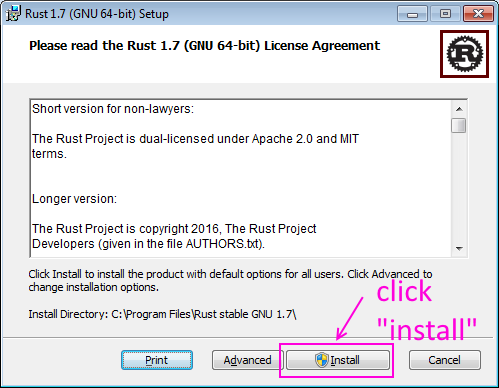
4. Rust lang installation wizard - Click "Install"

Rust install rust lang on windows 7 tutorial screenshot 4


5. Installing ...

Rust install rust lang on windows 7 tutorial screenshot 5


6. Rust lang installation completed - click "Finish" button.

Rust install rust lang on windows 7 tutorial screenshot 6

7. Now run windows command prompt and check Rust lang compiler version

Type following command:
rustc --version


Rust install rust lang on windows 7 tutorial screenshot 7