Vie Crypto Faucet and PTC
Showing posts with label tip. Show all posts

Windows 7: create new folder HOTKEY

Trabla: Windows 7: create new folder HOTKEY


Windows 7 create new folder HOTKEY


Solving:

To create new folder with hotkey
simply select windows and press

CTRL + SHIFT + N


Windows 7 create new folder HOTKEY example

LibreOffice Math Formula: create integral

Trabla: LibreOffice Math Formula: create integral


LibreOffice Math Formula create integral
This tutorial explains how to create integral in Math Formula app of LibreOffice.

Solving :

1. Run LibreOffice and click on Math Formula

LibreOffice Math Formula create integral tutorial 1

2. In Math Formula - select "Operators" in dropdown list

LibreOffice Math Formula create integral tutorial 2

3. Select "Integral" sign you need

LibreOffice Math Formula create integral tutorial 3

4. Hooray!!!

LibreOffice Math Formula create integral tutorial 4


5. Super Quick Way -  click on formula text editor
and simply type
int cos(x)dx

LibreOffice Math Formula create integral tutorial 5

So easy!!!

LibreOffice Math Formula create integral tutorial 6

Google Spreadsheet: enter Date data into cell

Trabla: Google Spreadsheet:  enter Date data into cell


Google Spreadsheet  enter Date data into cell


Solving:

1. Open Google Spreadsheet

Google Spreadsheet  enter Date data into cell  - tutorial 1


2. Select cell where you want put date data

Google Spreadsheet  enter Date data into cell  - tutorial 2


3. Type on keyboard

= Date( YYYY, MM, DD )   and press Enter

Where YYYY - year e.g. 1989
MM - month e.g. 11
DD - day e.g. 25

Example:

= Date( 1989, 11, 25 )

Google Spreadsheet  enter Date data into cell  - tutorial 3

Google Spreadsheet  enter Date data into cell  - tutorial 4

Google Spreadsheet  enter Date data into cell  - tutorial 5

Google Spreadsheet  enter Date data into cell  - tutorial 6

4. Hooray :)

Google Spreadsheet  enter Date data into cell  - tutorial 7


Google Spreadsheet: add current date and time

Trabla: Google Spreadsheet: add current date and time


Google Spreadsheet add current date and time

Solving:

1. Open Google Spreadsheet

Google Spreadsheet: add current date and time - tutorial 1

2. Select cell where you want put current date time

Google Spreadsheet: add current date and time - tutorial 2


3. Type on keyboard

= NOW()    and press Enter button

Google Spreadsheet: add current date and time - tutorial 3


4. Hooray :)

Google Spreadsheet: add current date and time - tutorial 4


Rust: check rust lang version in windows cmd

Trabla: Rust: check rust lang version in windows cmd


Solving: 

1. Open windows command prompt

2. Type flowing command and press Enter

rustc --version

Rust check rust lang version in windows cmd

Go: check golang version in windows cmd

Trabla: Go: check golang version in windows cmd


Solving: 

Simple type in windows command line following command

go version

Go check golang version in windows cmd


Unity3d: set android sdk path

Trabla: Unity3d: set android sdk path


Unity3d  set android sdk path tutorial

Environment:
Unity3D 5.3.3f1 installed.
OS: Windows.

Solving:

1. Run Unity3D Editor

2. Go to menu "Edit" -> "Preferences..."

Unity3d  set android sdk path tutorial screenshot 1


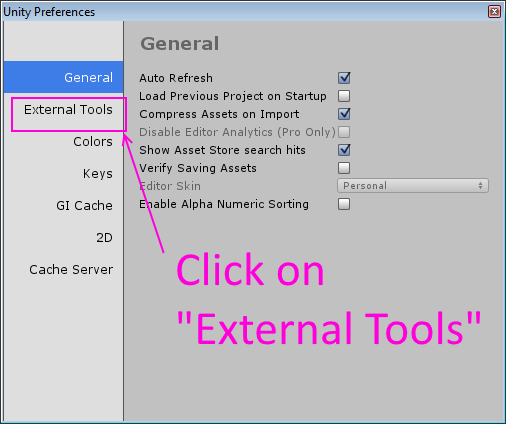
3. Select "External Tools" Tab

Unity3d  set android sdk path tutorial screenshot 2


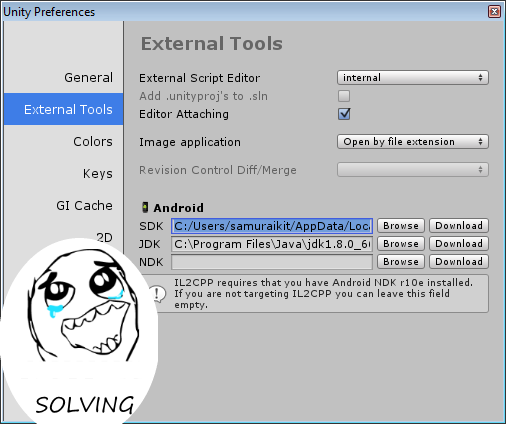
4. Type path to Android SDK  into "SDK" field  and close window

Unity3d  set android sdk path tutorial screenshot 3


Example:

Android SDK location (installed with Android Studio IDE ):
C:/Users/samuraikit/AppData/Local/Android/sdk

Unity3d  set android sdk path tutorial screenshot 4


Unity3d  set android sdk path tutorial screenshot 5


Sublime Text 2: open console

Trabla: Sublime Text 2: open console


Sublime Text 2 opencommand line console tutorial


Solving:

1. In Menu click "View" -> "Show Console"

2. Quick shortcut to open console -   Ctrl + ` 

Sublime Text 2 opencommand line console tutorial screenshot 1


TypeScript & JavaScript: compile ts to js

Trabla: TypeScript & JavaScript: compile ts to js


TypeScript & JavaScript compile ts to js
This tutorial explains how to compile TypeScript script (.ts) to JavaScript ( .js )
via npm (the node package manager) on windows.

Solving:

1. Install npm ( nodejs package manager ):

Howto: http://codingtrabla.blogspot.com/2016/03/npm-npm-install-on-windows.html

2. Sample file demo.ts

class Greeter {
    greeting: string;
    constructor(message: string) {
        this.greeting = message;
    }
    greet() {
        return "Hello, " + this.greeting;
    }
}

var greeter = new Greeter("world");


TypeScript & JavaScript: compile ts to js tutorial 1


3. Run windows command line, change directory to demo.ts location and execute following commands

npm install -g typescript
tsc demo.ts

Where npm install -g typescript - install typescript component for node,js globally
tsc demo.ts - compile ts to js.

TypeScript & JavaScript: compile ts to js tutorial 2

C:\Users\samuraikit>cd C:\Users\samuraikit\Desktop\typescript-demo
C:\Users\samuraikit\Desktop\typescript-demo>npm install -g typescript
C:\Users\samuraikit\AppData\Roaming\npm\tsserver -> C:\Users\samuraikit\AppData\
Roaming\npm\node_modules\typescript\bin\tsserver
C:\Users\samuraikit\AppData\Roaming\npm\tsc -> C:\Users\samuraikit\AppData\Roami
ng\npm\node_modules\typescript\bin\tsc
C:\Users\samuraikit\AppData\Roaming\npm
`-- typescript@1.8.7
C:\Users\samuraikit\Desktop\typescript-demo>tsc demo.ts
C:\Users\samuraikit\Desktop\typescript-demo>

4. Result - demo.js file

TypeScript & JavaScript: compile ts to js tutorial 3


npm: npm check version on windows

Trabla:  npm: npm check version on windows


Solving:

Use following command to check npm version in windows command line

npm -v

npm javascript package manager check version on windows 7 cmd


Eclipse: format code

Trabla: Eclipse: format code


Eclipse format code

Solving:

Simply press:

Ctrl + Shift + F

Eclipse: use command line arguments in eclipse

Trabla: Eclipse: use command line arguments in eclipse


Eclipse IDE use command line arguments in eclipse - tutorial


Solving:

1. This errors you get if run without setting command line arguments
Exception in thread "main" java.lang.ArrayIndexOutOfBoundsException: 0

Eclipse IDE use command line arguments in eclipse - tutorial screenshot 1


2. Click options button, near "Run" button - select "Run Configurations..."

Eclipse IDE use command line arguments in eclipse - tutorial screenshot 2


3. In "Run Confuguration" windows, select "Arguments" tab

Eclipse IDE use command line arguments in eclipse - tutorial screenshot 3

4. Type arguments in "Program arguments" text area.
Separate each argument by pressing Enter button.

Eclipse IDE use command line arguments in eclipse - tutorial screenshot 4


5. Press "Apply" button to save entered command line arguments.
Than click "Run" button to execute main method.

Eclipse IDE use command line arguments in eclipse - tutorial screenshot 5

6. Result - success. Hooray!!!
Now simply click "run" green button - entered arguments will be used.

Eclipse IDE use command line arguments in eclipse - tutorial screenshot 6


Eclipse MARS.2: search plugins

Trabla: Eclipse MARS.2: search plugins


Eclipse MARS.2  search plugins tutorial


Eclipse has built-in plugins searcher called - Marketplace,
with plugins from different plugins repositories.

Solving:

1. Run Eclipse

Eclipse MARS.2  search plugins tutorial screenshot 1


2. In menu click "Help" -> "Eclipse Marketplace"

Eclipse MARS.2  search plugins tutorial screenshot 2


3. Search Eclipse plugins in different market places

Eclipse MARS.2  search plugins tutorial screenshot 3


Ruby: check ruby version

Trabla:  Ruby: check ruby version


Ruby check ruby version

Solving:

Use following command:

ruby -v