Showing posts with label ANDROID. Show all posts

How to setup old-school Xiaomi Mi Band 3 with Samsung Galaxy A25 ( Android 16 )

How to setup old-school Xiaomi Mi Band 3 with Samsung Galaxy A25 ( Android 16 )


How to setup old-school Xiaomi Mi Band 3 with Samsung Galaxy A25 ( Android 16 )


In this tutorial, we will try to make an old-school Xiaomi Band 3 usable again with the latest Android phone, the Samsung A25 (Android 16).


Solving :


Watch on YouTube :

https://youtu.be/p8jUwnzn15k

Step 1. Find device.

Find your Xiaomi Mi Band 3 device and charging cable.


Find your Xiaomi Mi Band 3 device and charging cable.

Step 2. Charge device.

Put your Xiaomi Mi Band 3 device on charge, we need to fully charge it.

Put your Xiaomi Mi Band 3 device on charge, we need to fully charge it.


Step 3. Install Zepp Life application.


Install the Zepp Life app from the Google Play Store on your phone. We'll need it to pair your Xiaomi Mi Band 3.


Install the Zepp Life app from the Google Play Store on your phone. You'll need it to pair your Xiaomi Mi Band 3.


Step 4. Launch the app and authenticate. 

Open the app on your Android device, then log in or sign up. 
In my case, I logged in using an existing Google account.


Open the app on your Android device, then log in or sign up.  In my case, I logged in using an existing Google account.

Step 5. Grant permissions. 

Grant the permissions requested by the application on your mobile phone.

Grant the permissions requested by the application on your mobile phone.


Step 6. Unpair the old device.


I had connected an old device, so there was a pairing bug. To fix it, delete any old paired devices if they are showing.
Go to Profile, than click on My Device, than scroll down, than press the "Unpair" button.

Go to Profile, than click on My Device, than scroll down, than press the "Unpair" button.

Step 7. Execute the pairing process

Click on the plus button on the main screen.


Click on plus button on the main screen.


Then click on "Band" in the "Select device to pair" window, then agree to the information process.
Then click on "Band has no QR".


Than click on "Band" in "Select device to pair" window, than agree to info process.

Now the phone is searching for the device. 
Put the phone near the device. Hooray! Device found.


Put phone near device.


Now tap the Xiaomi Mi Band 3 device. Perfect! The device is paired.


Awesome! Our old-school device is fully functional. Well done!


How to Fix Annual Cycles of eCPM and Fillrate Drop in Mobile Games and Apps

How to Fix Annual Cycles of eCPM and Fillrate Drop in Mobile Games and Apps


In this tutorial, we will consider the following questions:

1. What are eCPM and fillrate ?

2. Why eCPM and fillrate drops?

3. What are eCPM / fillrate drop annual cycles?

4. What are key events when eCPM and fillrate grow?

5. How to fix eCPM and fillrate drop?

6. Strategy to use eCPM and fillrate drop in your favors


1. What are eCPM and fillrate ?

eCPM


eCPM stands for "effective cost per mille" (mille is Latin for thousand). It is a metric used in online advertising to measure the estimated earnings of an advertisement per 1,000 impressions. The term "effective" is used because it represents the average earnings generated for every 1,000 impressions, considering factors such as clicks, conversions, and other relevant actions.

The formula for calculating eCPM is:

eCPM=(Total Earnings / Total Impressions)×1000

  Here:Total Earnings: The total revenue generated from the ad campaign.
  Total Impressions: The total number of times the ad is displayed.

eCPM helps advertisers and publishers compare the relative performance of different advertising campaigns or channels. It provides a standardized way to assess and compare the efficiency of ad revenue generation, regardless of the specific pricing model used by the ad platform (e.g., cost per click, cost per mille, cost per acquisition).

Fill rate


Fill rate is a metric used in online advertising, particularly in the context of ad serving and impressions. It represents the percentage of ad requests that are successfully filled with ads and displayed to users compared to the total number of ad requests made.

The formula for calculating fill rate is:

Fill Rate=(Number of Ad Impressions Served / Number of Ad Impressions Requested)×100

  Here:Number of Ad Impressions Served: The total number of ad impressions that were successfully delivered and displayed to users.
  Number of Ad Impressions Requested: The total number of ad impressions that were requested by the website or app.

Fill rate is an important metric for publishers and ad networks because it reflects how effectively ad inventory is being utilized. A high fill rate indicates that a large percentage of ad requests are being successfully filled with ads, maximizing revenue potential. On the other hand, a low fill rate may suggest that there are unsold ad impressions, potentially leading to missed revenue opportunities. Publishers often aim to optimize fill rates to strike a balance between maximizing revenue and providing a positive user experience.

2. Why eCPM and fillrate drops / grows ?


The amount of money put into ads changes for the following reasons:

1) The end of fiscal year


A fiscal year is a 12-month period that organizations use for budgeting and forecasting. Many advertising agencies see the end of June as the end of their fiscal year. Typically, any expenditures set for a fiscal year must be used before the end of the fiscal year, which is why the market sees a massive influx of advertising money in June.

2) Boost of advertising budgets for Annual Holidays


Advertising budgets are typically increased when they can have the most impact on the consumer. CPMs and fill rates spike around annual holidays such as graduation season, Mother's and Father's Day, Thanksgiving, Black Friday, Cyber Monday and Christmas, New Year because individuals have more reasons to spend money. This is why we can always rely on Quarters 2 and 4 to be the most profitable quarters.

3) New quarter beginning is cheap


Brands tend to spend the least at the beginning of a new quarter of the year, and more towards the end of the quarter.

3. What are eCPM / fillrate drop annual cycles?


According to graph above we can see strict annual cycles. Months with minimal eCPM / fillrate : January ( lowest ), April, July, October. Months with highest eCPM and fillrate : March, June, November, December ( TOP ).
 

4. What are key events when eCPM and fillrate grow?


Simple answer - HOLIDAYS! International and local. Graduation season, Mother's and Father's Day, Thanksgiving, Black Friday, Cyber Monday and Christmas, New Year, etc.

5. How to fix eCPM and fillrate drop?


We can't fix it. It is external market state, like nature outdoor.

Out-of-the-box solution - add IN-APP PURCASES.

In-app purchases are a must to compensate eCPM and fillrate drop!!!


6. Strategy to use eCPM and fillrate drop in your favors


1) Ads in cheap months + In-app purchase monetization

If eCPM is low you can get a lot of install for game app for cheap. But you should have in-app purchases to monetize them.

2) Ads in before rich months + ads monetization

Invest in ads to promote your app / game just before rich months in case you only have ads monetization - than it will be quickly paid back in rich months.

Best game engines for 2d mobile games development

Best game engines for 2D mobile games development

best 2d mobile gamedev engines

There are several game engines available that are well-suited for developing 2D mobile games. The choice of a game engine depends on your specific requirements, programming skills, and personal preferences. Here are some popular game engines for 2D mobile game development:

  1. Unity:

    • Unity is a versatile game engine that supports both 2D and 3D game development.
    • It has a large community and a vast asset store, making it easy to find resources and plugins.
    • Supports both C# and JavaScript for scripting.
  2. Godot Engine:

    • Godot is an open-source game engine that is user-friendly and lightweight.
    • Godot supports a variety of programming languages for making games, including the integrated language GDScript, C++ and C#. Additionally, the engine includes GDNative, a facility for creating bindings with other languages. Officially-supported GDNative languages include C and C++. GDScript is easy to learn for beginners.

    • Supports multiple platforms, including mobile.
  3. Cocos2d-x:

    • Cocos2d-x is a popular open-source framework for building 2D games.
    • It supports multiple platforms, including iOS and Android.
    • Programmed in C++, and it has bindings for other languages like JavaScript and Lua.
  4. Solar2D ( ex Corona SDK ) :

    • Solar2D is known for its simplicity and ease of use.
    • It uses the Lua scripting language, which is easy for beginners to pick up.
    • Good for rapid development and prototyping.
  5. LibGDX:

    • LibGDX is a Java-based game development framework.
    • It supports cross-platform development and is suitable for 2D games.
    • It allows developers to deploy games to Android, iOS, desktop, and more.
  6. Phaser:

    • Phaser is a fast and lightweight JavaScript framework for building 2D games in the browser.
    • It is suitable for mobile games using web technologies (HTML5, JavaScript, and Canvas).
  7. GameMaker Studio:

    • GameMaker Studio is a user-friendly platform that doesn't require extensive programming knowledge.
    • It has a drag-and-drop interface and supports its scripting language, GML (GameMaker Language).

When choosing a game engine, consider factors like your programming skills, the specific requirements of your game, the target platforms, and the community support. It's also a good idea to try out a few engines to see which one aligns best with your development workflow and preferences.

My personal favorite - Solar2D. Empty project size is just 116 KB ( Unity's 1.2GB ! ) so it can be run easily on cheap laptop. Also free version of ChatGPT generates nice Lua code because tech is old enough and Lua language is simple and easy to learn.

For example check out my logical 2D game on Google Play made with Solar2D game engine :

Einstein's Riddles Android Game in Google Play

Android: Install and configure CALLS BLACKLIST 3.1.18

Trabla: Android: Install and configure CALLS BLACKLIST 3.1.18
 This app is both a call blocker and an SMS filte


Android: Install and configure CALLS BLACKLIST 3.1.18


Solving:


Android: Install and configure MANYTHING 4.8.0

Trabla: Android: Install and configure MANYTHING 4.8.0
Turn your old smartphone into a video monitoring camer
( Android KitKat 4.4.2 , Windows 10 x64)


Android: Install and configure MANYTHING 4.8.0

Solving:


Android: Install and Configure ALT-C 1.37

Trabla: Android: Install and Configure ALT-C 1.37
( Android KitKat 4.4.2 , Win Client 1.0.7 , Windows 10 x64 )
- Two way text copying between your PC and Smart devices


Android: Install and Configure ALT-C 1.37

Solving:


Android: Install and Configure AirDroid 4.1.04

Trabla: Android: Install and Configure AirDroid 4.1.04 ( Android KitKat 4.4.2 , Windows 10 x64  )


Android: Install and Configure AirDroid 4.1.04


Solving:


Install Adobe Flash Player on Android device

Trabla:  Install Adobe Flash Player on Android device ( Android KitKat 4.4.2 )


Install Adobe Flash Player on Android device

Solving:


How to: Enable Disable Android Developer Mode

Trabla: How to: Enable Disable Android Developer Mode


How to: Enable Disable Android Developer Mode


Solving:


Install NetX on Android - network discovery tools

Trabla: Install NetX on Android - network discovery tools ( Android KitKat 4.4.2 , NextX 3.6.4.0 )


Install NetX on Android - network discovery tools

Solving:


Android: how to fix error code 24 in Play Market using SD Maid 4.5.9 ( KitKat 4.4.2 )

Trabla: Android: how to fix error code 24 in Play Market using SD Maid 4.5.9 ( Androdi KitKat 4.4.2 )


Android: how to fix error code 24 in Play Market using SD Maid 4.5.9 ( KitKat 4.4.2 )

Solving:


Android : back up, factory data reset, restore ( Android KitKat 4.4.2 )

Trabla: How to back up your phone contacts, reset android phone to factory settings restore your phone contacts on Android KitKat 4.4.2


Android : back up, factory data reset, restore ( Android KitKat 4.4.2 )

Solving:


Use android phone as webcam on PC ( Windows 10 )

Trabla: How to use android phone as webcamera on PC ( Windows  10 )

Use android phone as webcam on PC ( Windows  10 )

Solving:


Unity3d: set android sdk path

Trabla: Unity3d: set android sdk path


Unity3d  set android sdk path tutorial

Environment:
Unity3D 5.3.3f1 installed.
OS: Windows.

Solving:

1. Run Unity3D Editor

2. Go to menu "Edit" -> "Preferences..."

Unity3d  set android sdk path tutorial screenshot 1


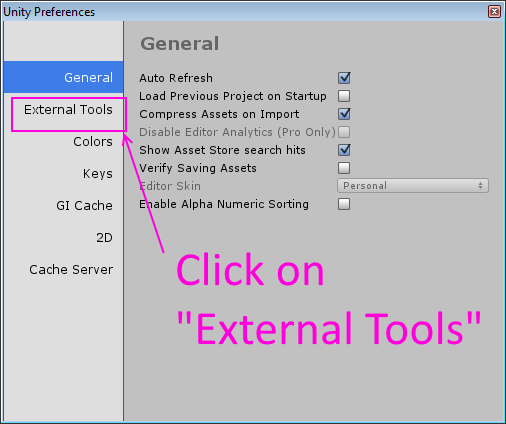
3. Select "External Tools" Tab

Unity3d  set android sdk path tutorial screenshot 2


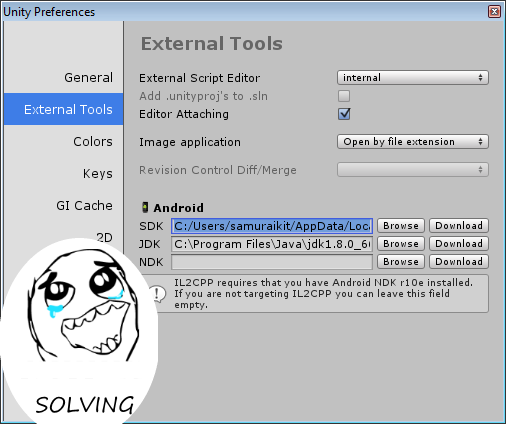
4. Type path to Android SDK  into "SDK" field  and close window

Unity3d  set android sdk path tutorial screenshot 3


Example:

Android SDK location (installed with Android Studio IDE ):
C:/Users/samuraikit/AppData/Local/Android/sdk

Unity3d  set android sdk path tutorial screenshot 4


Unity3d  set android sdk path tutorial screenshot 5


Android: Telegram android app - account self-destruction after 6 month no activity by default

TrablaAndroid: Telegram android app - autodelete your account (self-destruction :) ) after 6 month no activity by default


telegram logo


Solving:

1. Run Telegram android app - open menu ( left top upper corner )

Android Telegram android app auto delete setting - tutorial screenshot 1

2. Select "Settings"

Android Telegram android app auto delete setting - tutorial screenshot 2

3. Click on "Privacy and Security"

Android Telegram android app auto delete setting - tutorial screenshot 3

4. Click on "Account self-destruct"

Android Telegram android app auto delete setting - tutorial screenshot 4

5. Oops)))  Can't be solved

Android Telegram android app auto delete setting - tutorial screenshot 5


Android: Google Gmail android app - disable annoying notifications

Trabla: Android: Google Gmail android app - disable annoying notifications


Android: Google Gmail android app - disable annoying notifications - tutorial screenshot 1

Solving: 

1. Run Gmail android app - click on menu button ( left upper corner )

Android: Google Gmail android app - disable annoying notifications - tutorial screenshot 2

2. Swipe down in menu

Android: Google Gmail android app - disable annoying notifications - tutorial screenshot 3

3. Click "Settings"

Android: Google Gmail android app - disable annoying notifications - tutorial screenshot 4

4. Click on your account

Android: Google Gmail android app - disable annoying notifications - tutorial screenshot 5

5. Disable checkbox "Notifications"

Android: Google Gmail android app - disable annoying notifications - tutorial screenshot 6

Hooray!!! )))

Android: Google Gmail android app - disable annoying notifications - tutorial screenshot 7

Android: Google Translate App - add phrase to phrase book

Trabla: Android: Google Translate App - add phrase to phrase book


Solving:

1. Click on star

Android: Google Translate App - add phrase to phrase book 1

2. Star is yellow - phrase added. Open menu to check phrasebook.

Android: Google Translate App - add phrase to phrase book 2

3. Select "Phrasebook"

Android: Google Translate App - add phrase to phrase book 3

4. Hooray!!! Phrase "Je suis fou de toi" in phrasebook.

Android: Google Translate App - add phrase to phrase book 4


Android: disable phone notification light

Trabla: Android: disable phone notification light


Android phone use LED light to show incoming notifications. When it is disabled, only battery status warnings will be shown.

Solving:

1. Open android phone settings

2. Click on "Display" settings menu

Android: disable phone notification light - tutorial 1


2. Disable checkbox "Notification light"


Android: disable phone notification light - tutorial 2

Hooray!!!

Android: disable phone notification light - tutorial 3