Showing posts with label continuous integration. Show all posts

How to install TeamCity on Windows 10

Trabla: How to install TeamCity on Windows 10


How to install TeamCity on Windows 10

TeamCity is a Java-based build management and continuous integration server from JetBrains. It was first released on October 2, 2006. TeamCity is commercial software and licensed under a proprietary license. A Freemium license for up to 20 build configurations and 3 free Build Agent licenses is available. Open Source projects can request a free license.

TeamCity Official Site - https://www.jetbrains.com/teamcity/


Solving:


Jenkins: restart Jenkins via url ( manualy )

Trabla: Jenkins: restart Jenkins via url  ( manualy )


Jenkins  restart Jenkins using url ( manualy ) - tutorial
Solving:

To restart Jenkins manually - simply type one of following urls in browsers and press enter.

There are two options:

1. JENKINS_URL/safeRestart - this is save restart - all running jobs will be completed. New jobs will be in queue to run after the restart.

2. JENKINS_URL/restart  - force Jenkins restart

Examples:

This Jenkins running on localhost
http://localhost:8080/

Jenkins  restart Jenkins using url ( manualy ) - tutorial screenshot 1

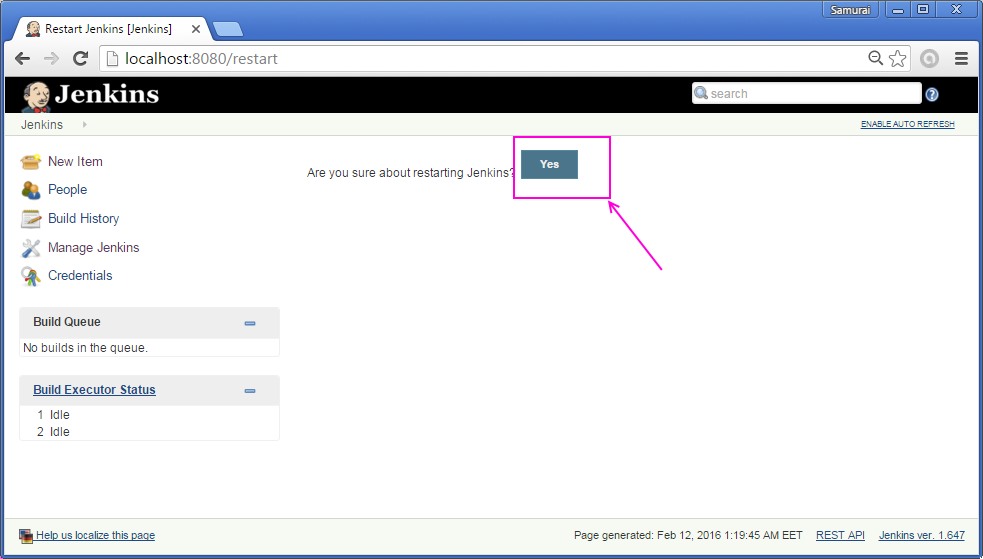
1) Type url http://localhost:8080/restart and press Enter

Jenkins  restart Jenkins using url ( manualy ) - tutorial screenshot 2

2) Press "Yes" button

Jenkins  restart Jenkins using url ( manualy ) - tutorial screenshot 3


3) Restart in progress ... 

Jenkins  restart Jenkins using url ( manualy ) - tutorial screenshot 4

4) Jenkins Restart Done :)

Jenkins  restart Jenkins using url ( manualy ) - tutorial screenshot 5


Jenkins: install jenkins on windows

Trabla: Jenkins: install jenkins on windows


Jenkins - install jenkins on windows tutorial

Jenkins is an open source continuous integration tool written in Java. The project was forked from Hudson after a dispute with Oracle.

Jenkins provides continuous integration services for software development. It is a server-based system running in a servlet container such as Apache Tomcat. It supports SCM tools including AccuRev, CVS, Subversion, Git, Mercurial, Perforce, Clearcase and RTC, and can execute Apache Ant and Apache Maven based projects as well as arbitrary shell scripts and Windows batch commands. The primary developer of Jenkins is Kohsuke Kawaguchi. Released under the MIT License, Jenkins is free software.

Builds can be started by various means, including being triggered by commit in a version control system, by scheduling via a cron-like mechanism, by building when other builds have completed, and by requesting a specific build URL.
Source: https://en.wikipedia.org/wiki/Jenkins_(software)


Solving:

1. Download Jankins for windows
https://jenkins-ci.org/

Jenkins - install jenkins on windows tutorial screenshot 1

2. Unzip archive and run installer

Jenkins - install jenkins on windows tutorial screenshot 2

 3. Jenkins installation wizard - press "Next"

Jenkins - install jenkins on windows tutorial screenshot 3

4. "Next" one more time

Jenkins - install jenkins on windows tutorial screenshot 4

5. Click "Install" button

Jenkins - install jenkins on windows tutorial screenshot 5

6. Installing ...

Jenkins - install jenkins on windows tutorial screenshot 6

Jenkins - install jenkins on windows tutorial screenshot 7

7. Press "Finish" button.

Jenkins - install jenkins on windows tutorial screenshot 8

8. Browser will be automatically opened. Enable autorefresh - top left corner. 

Jenkins - install jenkins on windows tutorial screenshot 9

9. Done

Jenkins - install jenkins on windows tutorial screenshot 10