Showing posts with label drupal. Show all posts

Install Drupal 8.2.6 via Bitnami installer on Windows 7 localhost

Trabla: Install Drupal 8.2.6 via Bitnami installer on Windows 7 localhost


Install Drupal 8.2.6 via Bitnami installer on Windows 7 localhost

Drupal is a free and open source content-management framework written in PHP and distributed under the GNU General Public License, Drupal provides a back-end framework for at least 2.2% of all Web sites worldwide – ranging from personal blogs to corporate, political, and government sites. Systems also use Drupal for knowledge management and for business collaboration.

The standard release of Drupal, known as Drupal core, contains basic features common to content-management systems. These include user account registration and maintenance, menu management, RSS feeds, taxonomy, page layout customization, and system administration. The Drupal core installation can serve as a simple Web site, a single- or multi-user blog, an Internet forum, or a community Web site providing for user-generated content.

Drupal Official Site - https://www.drupal.org/
Bitnami Drupal Official Site -  https://bitnami.com/stack/drupal

Solving:


Install Drupal 8.1.10 opensource PHP CMS on Windows 7 x64 localhost ( XAMPP 7.0.9 ) - Part 1/2

Trabla: Install Drupal 8.1.10 opensource PHP CMS on Windows 7 x64 localhost ( XAMPP 7.0.9 )  - Part 1/2

Install Drupal 8.1.10 opensource PHP CMS on Windows 7 XAMPP tutorial


Drupal /ˈdruːpəl/ is a free and open-source content-management framework ( CMS / CMF ) written in PHP and distributed under the GNU General Public License. It is used as a back-end framework for at least 2.1% of all Web sites worldwide ranging from personal blogs to corporate, political, and government sites. It is also used for knowledge management and business collaboration.

The standard release of Drupal, known as Drupal core, contains basic features common to content management systems. These include user account registration and maintenance, menu management, RSS feeds, taxonomy, page layout customization, and system administration. The Drupal core installation can serve as a simple Web site, a single- or multi-user blog, an Internet forum, or a community Web site providing for user-generated content.

Solving - Part 1 ( Part 2):


Watch on YouTube

1. Download and install XAMPP 7.0.9 ( with PHP7 ) from official site:
https://www.apachefriends.org/download.html

Install Drupal 8.1.10 opensource PHP CMS on Windows 7 XAMPP tutorial 1


2. Download Drupal 8.1.10 opensource PHP CMS / CMF  sources from official site:
https://www.drupal.org/download

Install Drupal 8.1.10 opensource PHP CMS on Windows 7 XAMPP tutorial 2

Install Drupal 8.1.10 opensource PHP CMS on Windows 7 XAMPP tutorial 3

Install Drupal 8.1.10 opensource PHP CMS on Windows 7 XAMPP tutorial 4


3. Create folder \drupal XAMPP htdocs folder

C:\xampp\htdocs\drupal

and copy all files from downloaded Drupal 8.1.10 opensource PHP CMS / CMF .zip source

Install Drupal 8.1.10 opensource PHP CMS on Windows 7 XAMPP tutorial 5


4. Run XAMPP Control Panel 

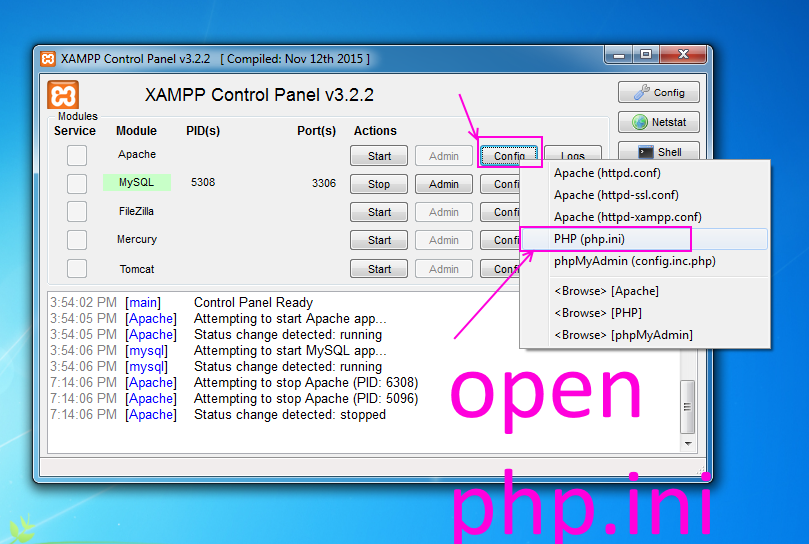
open php.ini file ( Apache ->  Config-> PHP(php.ini) )

Install Drupal 8.1.10 opensource PHP CMS on Windows 7 XAMPP tutorial 6

- change max_execution_time value
from max_execution_time=30 to max_execution_time=600

Install Drupal 8.1.10 opensource PHP CMS on Windows 7 XAMPP tutorial 7

- uncomment ( remove semicolon ) opcache.enable  and change value to 1
from ;opcache.enable=0  to opcache.enable=1

Install Drupal 8.1.10 opensource PHP CMS on Windows 7 XAMPP tutorial 8


- add following string to end of file
zend_extension = "C:\xampp\php\ext\php_opcache.dll"


Install Drupal 8.1.10 opensource PHP CMS on Windows 7 XAMPP tutorial 9


- save  & close php.ini
- start Apache
- start Database

Install Drupal 8.1.10 opensource PHP CMS on Windows 7 XAMPP tutorial 10


5. Open in browser following url to start  Drupal 8.1.10 opensource PHP CMS / CMF  web installation
http://localhost/drupal


"Choose language" page of Drupal 8.1.10 opensource PHP CMS / CMF  web installation

- click "Save and continue" button

Install Drupal 8.1.10 opensource PHP CMS on Windows 7 XAMPP tutorial 11


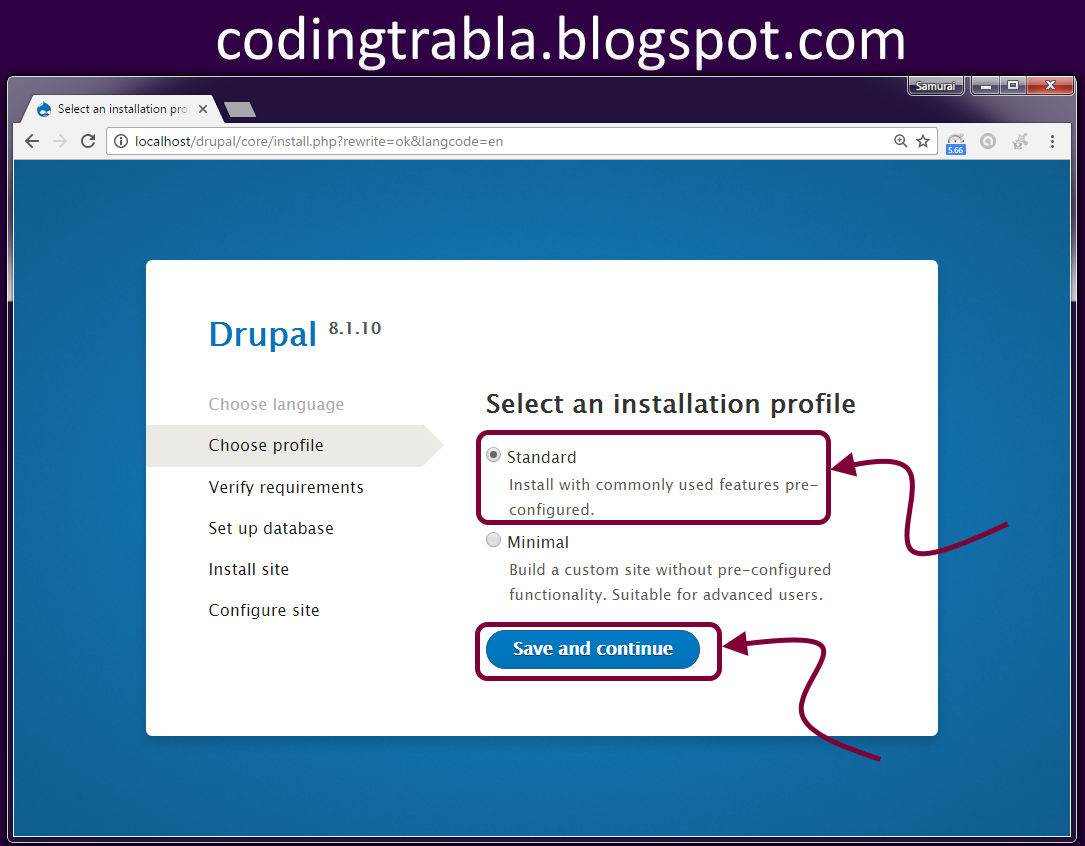
6. "Select installation profile" page of Drupal 8.1.10 opensource PHP CMS / CMF  web installation

- select "Standard" profile
- click "Save and continue" button

Install Drupal 8.1.10 opensource PHP CMS on Windows 7 XAMPP tutorial 12


NEXT - Part 2


Install Drupal 8.1.10 opensource PHP CMS on Windows 7 x64 localhost ( XAMPP 7.0.9 ) - Part 2/2

Trabla: Install Drupal 8.1.10 opensource PHP CMS on Windows 7 x64 localhost ( XAMPP 7.0.9 ) -  Part 2/2


Install Drupal 8.1.10 opensource PHP CMS on Windows 7 XAMPP tutorial


Drupal /ˈdruːpəl/ is a free and open-source content-management framework ( CMS / CMF ) written in PHP and distributed under the GNU General Public License. It is used as a back-end framework for at least 2.1% of all Web sites worldwide ranging from personal blogs to corporate, political, and government sites. It is also used for knowledge management and business collaboration.

The standard release of Drupal, known as Drupal core, contains basic features common to content management systems. These include user account registration and maintenance, menu management, RSS feeds, taxonomy, page layout customization, and system administration. The Drupal core installation can serve as a simple Web site, a single- or multi-user blog, an Internet forum, or a community Web site providing for user-generated content.


Solving - Part 2 ( Part 1):


Watch on YouTube

7. "Database configuration" page of Drupal 8.1.10 opensource PHP CMS / CMF  web installation

Install Drupal 8.1.10 opensource PHP CMS on Windows 7 XAMPP tutorial 1

Now we need to create Database for Drupal 8.1.10 opensource PHP CMS / CMF

1) Open phpMyAdmin in new browser tab (or window :) ) -

 http://localhost/phpmyadmin

2) Open SQL tab
3) Execute following query

Install Drupal 8.1.10 opensource PHP CMS on Windows 7 XAMPP tutorial 2

CREATE DATABASE `drupal` 
DEFAULT CHARACTER SET utf8 COLLATE utf8_general_ci;

CREATE USER 'drupal-owner'@'localhost'; 
CREATE USER 'drupal-owner'@'127.0.0.1';
CREATE USER 'drupal-owner'@'::1';

SET PASSWORD 
FOR 'drupal-owner'@'localhost' = PASSWORD('drupal123$%');
SET PASSWORD 
FOR 'drupal-owner'@'127.0.0.1' = PASSWORD('drupal123$%');
SET PASSWORD 
FOR 'drupal-owner'@'::1' = PASSWORD('drupal123$%');


GRANT ALL PRIVILEGES ON 
`drupal`.* TO 'drupal-owner'@'localhost' WITH GRANT OPTION;
GRANT ALL PRIVILEGES ON 
`drupal`.* TO 'drupal-owner'@'127.0.0.1' WITH GRANT OPTION;
GRANT ALL PRIVILEGES ON 
`drupal`.* TO 'drupal-owner'@'::1' WITH GRANT OPTION;

Install Drupal 8.1.10 opensource PHP CMS on Windows 7 XAMPP tutorial 3

Install Drupal 8.1.10 opensource PHP CMS on Windows 7 XAMPP tutorial 4

Go back  to Drupal 8.1.10 opensource PHP CMS / CMF installation page

- select Database type - "MySQL, MariaDB ... "
- type Database Name -  drupal
- type Database Username -  drupal-owner
- type Database  Password drupal123$%

- click "Save and continue" button

Install Drupal 8.1.10 opensource PHP CMS on Windows 7 XAMPP tutorial 5


8. Installing ...

Install Drupal 8.1.10 opensource PHP CMS on Windows 7 XAMPP tutorial 6

Install Drupal 8.1.10 opensource PHP CMS on Windows 7 XAMPP tutorial 7


9. "Configure site" page of Drupal 8.1.10 opensource PHP CMS / CMF  web installation

type your data
- scroll down
- click "Save and continue"

Install Drupal 8.1.10 opensource PHP CMS on Windows 7 XAMPP tutorial 8


Install Drupal 8.1.10 opensource PHP CMS on Windows 7 XAMPP tutorial 9


Hooray !!! Enjoy Drupal 8.1.10 opensource PHP CMS / CMF !!!

Install Drupal 8.1.10 opensource PHP CMS on Windows 7 XAMPP tutorial 10

Install Drupal 8.1.10 opensource PHP CMS on Windows 7 XAMPP tutorial 11

Install Drupal 8.1.10 opensource PHP CMS on Windows 7 XAMPP tutorial 12

Install Drupal 8.1.10 opensource PHP CMS on Windows 7 XAMPP tutorial 13

Install Drupal 8.1.10 opensource PHP CMS on Windows 7 XAMPP tutorial 14

Install Drupal 8.1.10 opensource PHP CMS on Windows 7 XAMPP tutorial 15

Drupal & XAMPP: Fatal error: Maximum execution time exceeded

Trabla: Drupal & XAMPP: Fatal error: Maximum execution time exceeded


Drupal & XAMPP: Fatal error: Maximum execution time exceeded


An AJAX HTTP error occured.
HTTP Result Code: 200
Debugging information follows.
Path: /drupal/core/install.?
rewrite=ok&langcode=en&profile=standard
&continue=1&id=1&op=do_nojs&op=do
StatusText: OK
ResponseText:
Fatal error: Maximum execution time of 30
seconds exceeded in
C:\xampp\htdocs\drupal\core\lib\Drupal\Core\
Database\Statement.php on line 59

Lets fix this error:

1) Open XAMPP control panel - stop Apache


Fix Drupal XAMPP Fatal error Maximum execution time exceeded 1


2) Open php.ini file from XAMPP control panel

Fix Drupal XAMPP Fatal error Maximum execution time exceeded 2


3) Find string
max_execution_time=30
Replace with
max_execution_time=300

Fix Drupal XAMPP Fatal error Maximum execution time exceeded 3


4) Save php.ini file

Fix Drupal XAMPP Fatal error Maximum execution time exceeded 4


5) Start Apache from XAMPP control panel

6) Reload Drupal installation page in browser

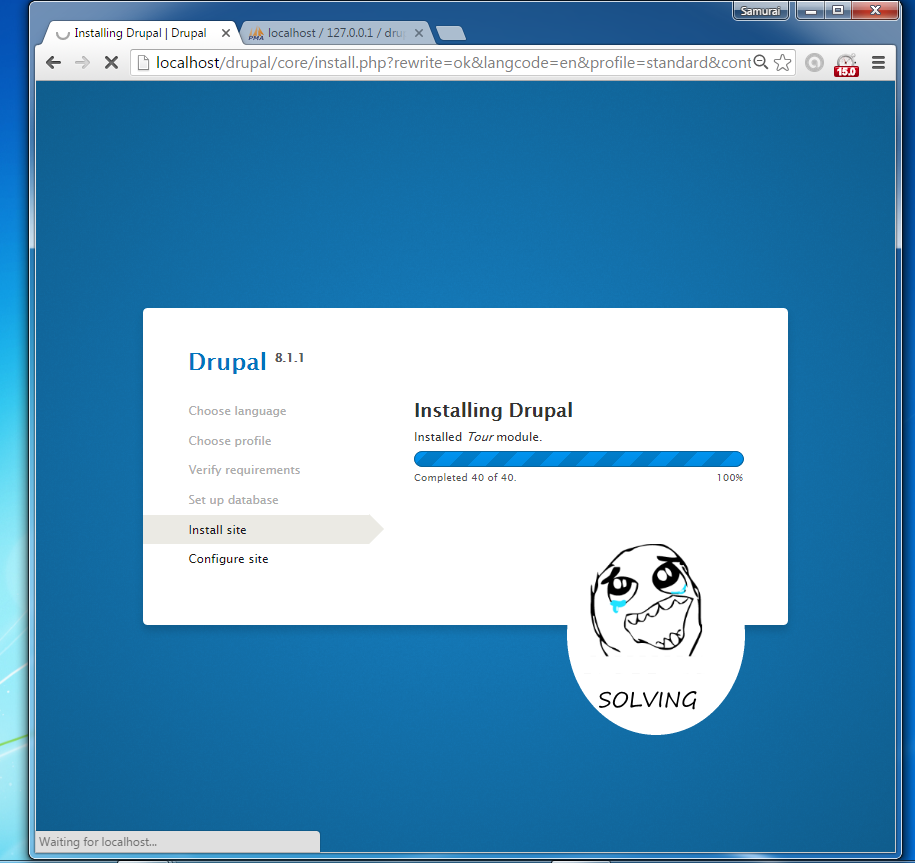
12. Installation continuing

Fix Drupal XAMPP Fatal error Maximum execution time exceeded 5


Install Drupal 8.1.1 on windows ( XAMPP + php7 )

Trabla: Install Drupal 8.1.1 on windows ( XAMPP + php7 )


Install Drupal 8.1.1 on windows ( XAMPP + php7 )
Drupal /ˈdruːpəl/ is a free and open-source content-management framework written in PHP and distributed under the GNU General Public License. It is used as a back-end framework for at least 2.1% of all Web sites worldwide ranging from personal blogs to corporate, political, and government sites. It is also used for knowledge management and business collaboration.

The standard release of Drupal, known as Drupal core, contains basic features common to content management systems. These include user account registration and maintenance, menu management, RSS feeds, taxonomy, page layout customization, and system administration. The Drupal core installation can serve as a simple Web site, a single- or multi-user blog, an Internet forum, or a community Web site providing for user-generated content.
https://en.wikipedia.org/wiki/Drupal

Latest tutorial - Install Drupal 8.1.10 opensource PHP CMS on Windows 7 x64 localhost ( XAMPP 7.0.9 ) - http://codingtrabla.blogspot.com/2016/10/install-drupal-8110-opensource-php-cms.html

Solving:

1. Download and install XAMPP with php 7
https://apachefriends.org/download.html

Install Drupal 8.1.1 on windows ( XAMPP + php7 ) tutorial 1


2. Download Drupal sources from official site
https://www.drupal.org/project/drupal/releases/8-1-1

Install Drupal 8.1.1 on windows ( XAMPP + php7 ) tutorial 2

Install Drupal 8.1.1 on windows ( XAMPP + php7 ) tutorial 3

3. Create folder /drupal in XAMPP htdocs and copy files from downloaded archive
e.g. on my computer
C:\xampp\htdocs\drupal

Install Drupal 8.1.1 on windows ( XAMPP + php7 ) tutorial 4

4. Open XAMPP Control Panel and start apache and mysql database
If all is ok you will see green labels

Install Drupal 8.1.1 on windows ( XAMPP + php7 ) tutorial 5

5. Open browser and type following localhost address to start installation of Drupal 8.1.1

http://localhost/drupal

Click "Save and continue" to start installation process
Install Drupal 8.1.1 on windows ( XAMPP + php7 ) tutorial 6

6. "Choose profile" page - select "Standart" and click "Save and continue" button

Install Drupal 8.1.1 on windows ( XAMPP + php7 ) tutorial 7

7. Click "Continue anyway"

Install Drupal 8.1.1 on windows ( XAMPP + php7 ) tutorial 8

8. Now we need create database for Drupal - open in new browser tab "phpMyAdmin"
database client ( installed with XAMPP )
http://localhost/phpmyadmin

1) Select "Databases" tab
2) Type database name - e.g. "drupal"
3) Select encoding - utf8-general-ci
4) Press "Create" button

Install Drupal 8.1.1 on windows ( XAMPP + php7 ) tutorial 9

Install Drupal 8.1.1 on windows ( XAMPP + php7 ) tutorial 10


9. Continue with Drupal installation -
"Set up database" page
1) Select database type - "MySQL, ... "
2) Type database name - "drupal"  ( defined in  step 8 )
3) Type database username - "root" ( XAMPP default settings )
4) Database password - leave empty  ( XAMPP default settings )
5) Press "Save and continue" button

Install Drupal 8.1.1 on windows ( XAMPP + php7 ) tutorial 11

10. Installing ...

Install Drupal 8.1.1 on windows ( XAMPP + php7 ) tutorial 12

11. After some time of installation process ... - Ooops - FATAL ERROR

Install Drupal 8.1.1 on windows ( XAMPP + php7 ) tutorial 13

An AJAX HTTP error occured.
HTTP Result Code: 200
Debugging information follows.
Path: /drupal/core/install.?
rewrite=ok&langcode=en&profile=standard
&continue=1&id=1&op=do_nojs&op=do
StatusText: OK
ResponseText:
Fatal error: Maximum execution time of 30
seconds exceeded in
C:\xampp\htdocs\drupal\core\lib\Drupal\Core\
Database\Statement.php on line 59

Lets fix this error:

1) Open XAMPP control panel - stop Apache


Install Drupal 8.1.1 on windows ( XAMPP + php7 ) tutorial 14


2) Open php.ini file from XAMPP control panel

Install Drupal 8.1.1 on windows ( XAMPP + php7 ) tutorial 15


3) Find string
max_execution_time=30
Replace with
max_execution_time=300

Install Drupal 8.1.1 on windows ( XAMPP + php7 ) tutorial 16


4) Save php.ini file

Install Drupal 8.1.1 on windows ( XAMPP + php7 ) tutorial 17


5) Start Apache from XAMPP control panel

6) Reload Drupal installation page in browser

12. Installation continuing

Install Drupal 8.1.1 on windows ( XAMPP + php7 ) tutorial 18

13. "Site configuration" page - enter all required data

Install Drupal 8.1.1 on windows ( XAMPP + php7 ) tutorial 19

14. Disable - "auto updates" checkbox and press "Save and continue"

Install Drupal 8.1.1 on windows ( XAMPP + php7 ) tutorial 20

15. Done. Hooray !!!

Install Drupal 8.1.1 on windows ( XAMPP + php7 ) tutorial 21